
Table of contents
Your first Django project feels great for about ten minutes. Then you add a second feature, a third, and a pile of templates. Suddenly settings.py is 400 lines long and you’re scrolling like you’re hunting for a lost sock.
I’ve seen this happen a lot, and the fix is rarely clever code. It’s a Django project structure example you can copy, understand, and grow. So that’s what we’ll build here, step by step, using one running example: a small shop with accounts, a catalog, and orders.
No jargon. No “it depends” without telling you what it depends on. Let’s go.
1. Start With What Django Gives You (and Don’t Panic)
Run this:
django-admin startproject config .
You get this:
myshop/
├── manage.py
└── config/
    ├── __init__.py
    ├── settings.py
    ├── urls.py
    ├── asgi.py
    └── wsgi.py
That’s it. Here’s what each file does:
| File | What it does |
|---|---|
manage.py |
Your command-line helper. You run runserver, migrate, and test through it. |
settings.py |
Every project-wide setting: apps, database, templates, static files. |
urls.py |
The top-level map of URLs. |
wsgi.py / asgi.py |
Entry points for production servers. You’ll rarely touch them. |
Notice I named the inner folder config instead of myshop. Django’s default repeats the project name twice (myshop/myshop/), and that confuses nearly every beginner. Naming it config makes its job obvious: this folder holds configuration, not features. Cookiecutter Django, a popular starter template, uses the same idea of separating configuration from application code.
2. Know the Difference Between a Project and an App
This trips everyone up, so here’s a simple analogy.
The project is the restaurant. It owns the building, the license, and the opening hours. The apps are the stations inside: grill, bar, desserts. Each does one job, and you could, in theory, move one to a different restaurant.
In Django terms:
- Project: the settings and URL setup that tie everything together.
- App: one feature with its own models, views, and tests.
For our shop, I’d make three apps: accounts, catalog, and orders. Create one like this:
python manage.py startapp catalog
Django generates models.py, views.py, admin.py, apps.py, tests.py, and a migrations/ folder. Then you add "catalog" to INSTALLED_APPS, and Django knows it exists.
A good rule of thumb: if you can describe the app in one short sentence without using the word “and,” it’s probably the right size.
3. Build a Multi-App Layout That Makes Sense
Here’s our shop with three apps:
myshop/
├── manage.py
├── config/
│   ├── settings.py
│   ├── urls.py
│   └── ...
├── accounts/
├── catalog/
└── orders/
Simple. Each app is its own neighborhood, and you can tell what lives where just by looking at the folder names.
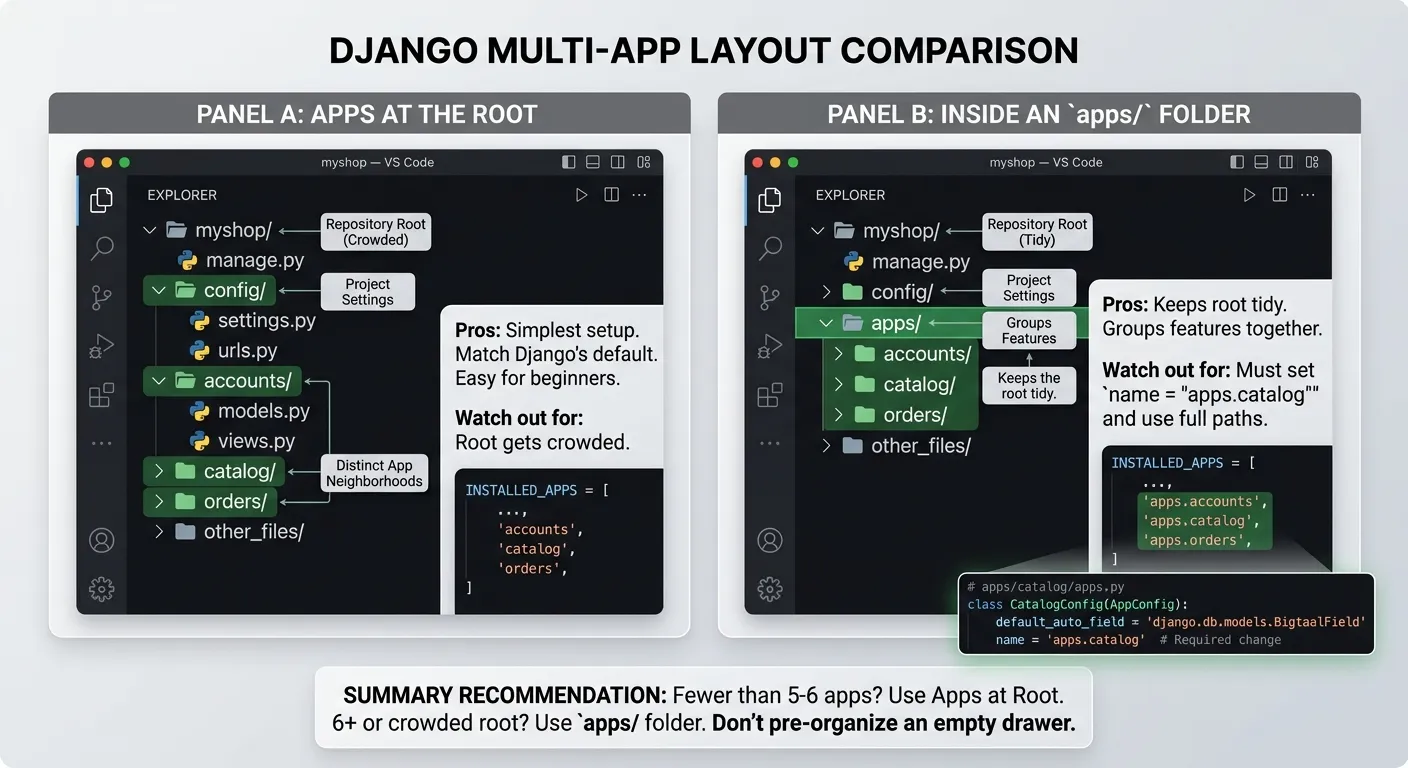
Should apps live at the root or inside an apps/ folder? Both work. Here’s how they compare:
| Layout | Pros | Watch out for |
|---|---|---|
| Apps at the root | Simplest setup, matches Django’s defaults, easy for beginners | The root gets crowded as you add apps |
Inside an apps/ folder |
Keeps the root tidy, groups features together | You must use paths like apps.catalog in INSTALLED_APPS and set name = "apps.catalog" in the app’s AppConfig |
My honest take: if you have fewer than five or six apps, stay at the root. Move to
apps/when the root starts to feel like a junk drawer. Don’t pre-organize a drawer that’s still empty.
4. Split Your Settings Before They Split You
Remember that 400-line settings.py? Here’s the escape route. Turn settings.py into a package:
config/
├── settings/
│   ├── __init__.py
│   ├── base.py
│   ├── local.py
│   └── production.py
├── urls.py
├── asgi.py
└── wsgi.py
The idea is simple:
base.pyholds what’s the same everywhere (installed apps, middleware, templates).local.pyimports from base and adds development extras, likeDEBUG = True.production.pyimports from base and tightens things up: security settings, a real database, allowed hosts.
You choose which one to use with the DJANGO_SETTINGS_MODULE environment variable. For example, config.settings.local on your laptop and config.settings.production on the server.
A couple of tools can help. django-environ reads secrets from environment variables, and django-split-settings merges multiple settings files in order. Both are optional, though. Plain Python imports work fine when you’re starting out.
One rule I’d tattoo on every beginner’s arm: never commit secrets. Keep your secret key and database password in environment variables or an
.envfile that’s listed in.gitignore. Commit a.env.examplewith fake values so teammates know what to fill in.
5. Give Templates a Home (Two Good Options)
Templates are where messy projects get really messy. Django supports two patterns, and you can use both.
Project-level templates live in one shared folder at the root:
templates/
├── base.html
├── 404.html
└── includes/
    └── navbar.html
App-level templates live inside each app, in a folder with the app’s name:
catalog/
└── templates/
    └── catalog/
        ├── product_list.html
        └── product_detail.html
See that doubled catalog/catalog/? It’s not a typo. Django merges all template folders into one big pool. If two apps both have detail.html, Django may pick the wrong one. The extra folder level is a namespace that prevents the clash.
To use the shared folder, add it to the DIRS list in your TEMPLATES setting. Keep APP_DIRS set to True so Django also finds the app-level ones.
My simple rule: shared stuff (base layout, navbar, error pages) goes in the root
templates/. Feature-specific pages go inside their app.
6. Keep Static Files and Media Files Separate
People mix these up constantly, so let me untangle them.
- Static files are things you ship: CSS, JavaScript, logos.
- Media files are things users upload: profile photos, product images.
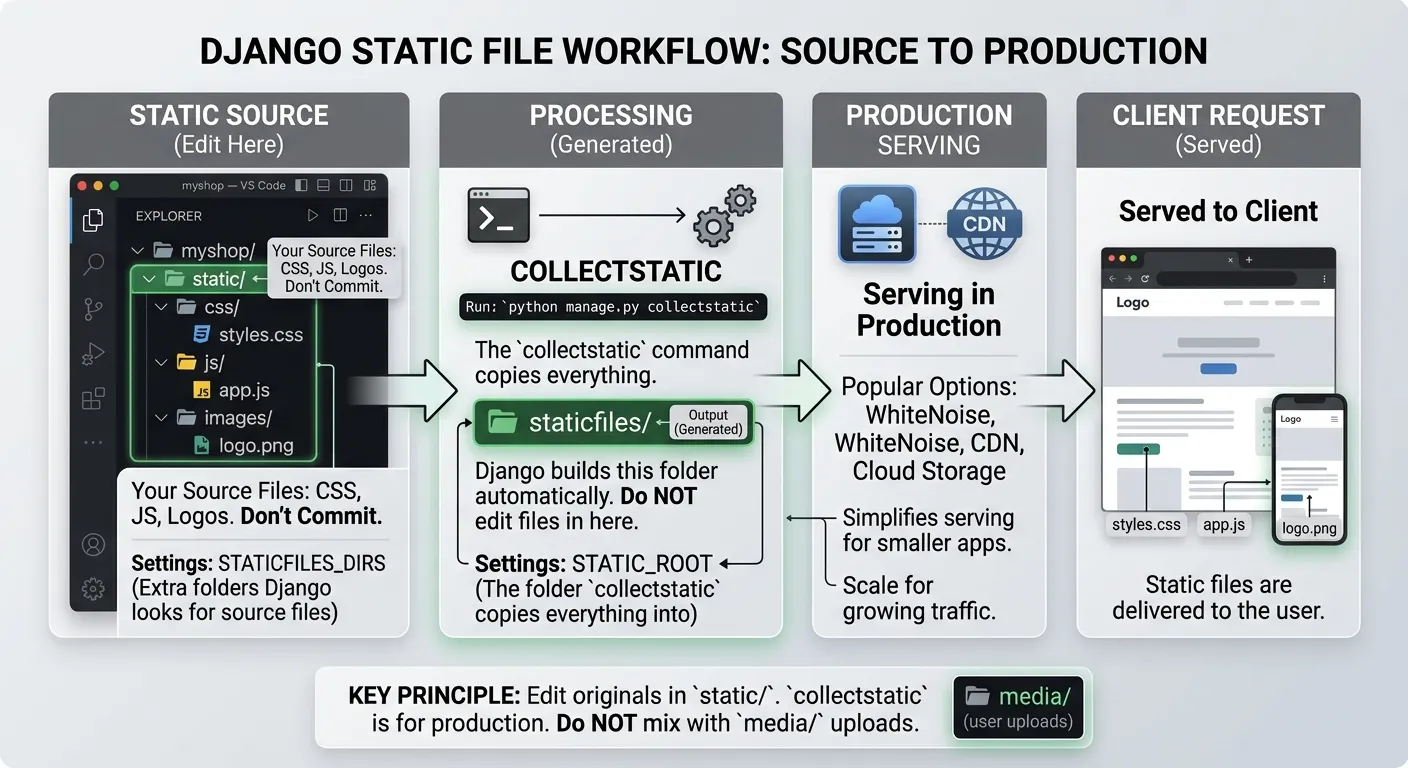
A tidy layout looks like this:
myshop/
├── static/          # your source CSS, JS, images
├── staticfiles/     # collected output (generated, not committed)
└── media/           # user uploads (not committed)
The key settings are:
| Setting | Purpose |
|---|---|
STATICFILES_DIRS |
Extra folders where Django looks for your static source files |
STATIC_ROOT |
The folder collectstatic copies everything into for production |
MEDIA_URL and MEDIA_ROOT |
The URL and folder for uploaded files |
Here’s the part that bites people: staticfiles/ is generated. Don’t edit files in there, and don’t commit it. Edit the originals in static/ and let collectstatic do its thing.
For serving static files in production, WhiteNoise is a popular, simple option. Many teams also use a CDN or cloud storage as traffic grows.
7. Organize Tests and Grow Your Files Gracefully
Tests
startapp hands you a single tests.py. That’s fine on day one. By week three, it’s a swamp. Swap it for a package:
catalog/
└── tests/
    ├── __init__.py
    ├── test_models.py
    ├── test_views.py
    └── test_forms.py
Delete the old tests.py when you do this. If both exist, you’ll get confusing import errors. Name the files after what they test, and future you will send thank-you notes.
If you like pytest, pytest-django plugs it into Django, and factory_boy helps you create test data without hand-writing fixtures.
Splitting big files
When does models.py need to become a folder? When you can’t find things anymore. That’s the honest test, not a line count.
catalog/
└── models/
    ├── __init__.py
    ├── product.py
    └── category.py
The __init__.py imports your models so the rest of the project still sees them as catalog.models.Product. Same trick works for views.
Where does business logic go?
There’s no single right answer, and anyone who tells you otherwise is selling something. Here are the common options:
| Approach | Good for |
|---|---|
| Put logic in models (methods) | Rules that belong to one object, like order.total() |
Keep views thin, logic in a services.py |
Multi-step actions like “place order, charge card, send email” |
| Everything in views | Tiny projects and quick prototypes |
I like starting with model methods and adding a services.py the first time a view starts doing five things at once. A view’s job is to handle a request, not to run your whole company.
8. Add an API Layer Without Making a Mess
Building an API with Django REST Framework? Give it its own corner. Inside each app, a small api/ package works well:
catalog/
└── api/
    ├── __init__.py
    ├── serializers.py
    ├── views.py
    ├── permissions.py
    └── urls.py
Serializers turn your models into JSON, API views handle requests, and urls.py is included from the project’s main URLs, often under a prefix like /api/. Keeping this separate from your regular HTML views means you can change one without breaking the other.
Prefer something more modern-feeling? Django Ninja is an alternative built around Python type hints. You wouldn’t install it alongside DRF; pick one. If you need API docs, drf-spectacular generates OpenAPI schemas for DRF.
Put API tests in their own file too, such as tests/test_api.py.
The Full Picture: One Finished Example
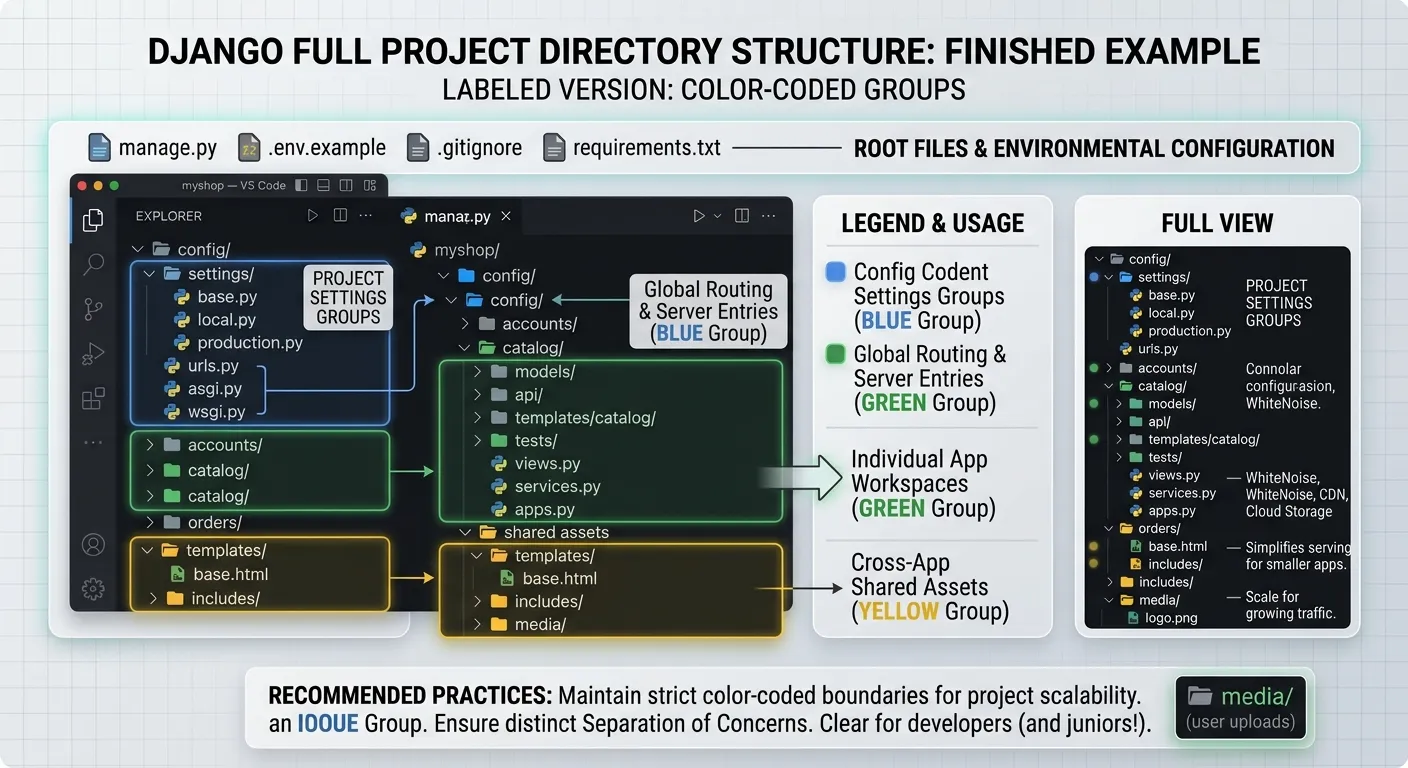
Here’s everything together. This is the layout I’d hand to a junior developer on day one:
myshop/
├── manage.py
├── .env.example
├── .gitignore
├── requirements.txt
├── config/
│   ├── settings/
│   │   ├── base.py
│   │   ├── local.py
│   │   └── production.py
│   ├── urls.py
│   ├── asgi.py
│   └── wsgi.py
├── accounts/
├── catalog/
│   ├── models/
│   ├── api/
│   ├── templates/catalog/
│   ├── tests/
│   ├── views.py
│   ├── services.py
│   └── apps.py
├── orders/
├── templates/
│   ├── base.html
│   └── includes/
├── static/
└── media/
Shortcut Alert: Should You Just Use Cookiecutter Django?
Maybe. Cookiecutter Django generates a full, production-minded project with settings split, Docker options, and a clear separation between configuration and apps. It’s a great way to study a professional layout.
But here’s my advice: build the small version by hand first. When you understand why each folder exists, a template feels like a helpful friend. When you don’t, it feels like a haunted house with a lot of rooms.
Other starters worth a peek include DjangoX, wemake-django-template, and Docker-based templates. Treat them as references, not rules.
| Option | Best for |
|---|---|
| Hand-built layout | Learning, small projects, full control |
| Cookiecutter Django | Production-oriented projects, learning real-world conventions |
| Other templates | Comparing opinions and borrowing ideas |
Quick Answers to Common Questions
What’s the difference between a Django project and an app?
The project holds configuration. An app is one feature. A project can have many apps.
Where should tests go?
Inside each app, in a tests/ package, split by what they test.
How should I handle development and production settings?
Use a settings package with base.py, local.py, and production.py, and pick one with DJANGO_SETTINGS_MODULE.
Should I split models.py?
Only when it’s hard to navigate. Use a models/ package and import everything in __init__.py.
How does the layout change as the app grows?
Start flat. Add an apps/ folder, services, and an API layer when the pain shows up, not before.
Final Thoughts
A good Django project structure isn’t about being fancy. It’s about answering one question quickly: “Where does this go?” If you and your teammates can answer that without a meeting, your structure is working.
Start small. Name things clearly. Split a file only when it hurts. And remember that every pro layout you admire started as a plain startproject and a few good decisions.
Your turn: pick one section above, say splitting your settings, and apply it to your own project today.